
By David Gewirtz
A few weeks ago, we published an article about how to create romantic picture effects using a free software program. Now, with Mother's Day just behind us, it's only fitting that we talk about free software for the kids that may eventually arrive after some good romancing.
Tux Paint, shown in Figure A, is a painting program designed for kids. It's open source and completely free.
FIGURE A
Let your kids paint! (click for larger image)
What makes Tux Paint so cool is it's designed with kids in mind. It's also ideally suited to older computers, with an interface designed to run in a screen as small as 640x480, so you can put your toddler on that old box you're not sure what to do with anymore and keep the little monster off your main machine.
Special effects
The program comes with hundreds of stamp effects, as shown in Figure B, along with the usual selection of painting tools.
FIGURE B
Your child can stamp on the screen and keep his dirty paws off your walls. (click for larger image)
What's cool is that this is a reasonably full-featured program, hidden inside of a kid's interface. For example, the program comes with a wide set of filters. Table A has a full list.
Table A: Tux Paint has a wide array of filters| Filter | Description |
| Fill | "flood-fill" an area with a particular color |
| Grass | paint realistic clumps of grass on the screen and into the distance |
| Bricks | paint realistic large or small brick patterns |
| Rainbow brush | draw using a brush that paints in all colors in the rainbow |
| Sparkles | draw glowing yellow sparkles |
| Blur | blur parts of the picture using the mouse |
| Smudge | push the colors around as though smudging wet paint |
| Lighten | fade the colors of parts of the picture |
| Darken | darken the colors of parts of the picture |
| Chalk | make parts of the picture look like a chalk drawing |
| Blocks | turn parts of the picture "blocky" |
| Negative | invert the colors of parts of the picture |
| Tint | change the color of parts of the picture |
| Drip | make parts of the picture look like it's dripping away |
| Cartoon | make parts of the picture look like a cartoon |
| Mirror | flip the image horizontally |
| Flip | flip the image vertically |
Making things fun, sound effects are played when your munchkin selects and uses any of the tools. And yes, you can turn off the sounds, either temporarily with a keyboard command (Alt-S, for blessed silence) or by making a permanent change to the program's config file.
Protecting your machine
One of the biggest problems with traditional paint programs is the user has to be able to navigate the file system to find and update his pictures. For a tiny tot (or your dad, when he comes to visit!), you just don't want to leave the file system open for that inevitable mucking about. To select an existing image, all the little tike need do is select a picture, as shown in Figure C.
FIGURE C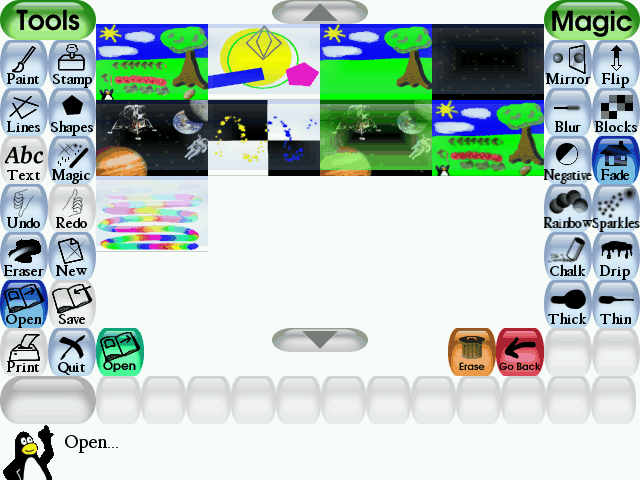
Save and open files by clicking a picture. (click for larger image)
You can force the program to run in full screen, disable printing, and disable the ability for a user to quit, tab out, or otherwise exit the program.
When saving new images, you can force the program to never allow saving over an existing image, thereby making sure your little sweetie never loses any of her work.
We are the world.
If you're not a native English speaker (or reader), Tux Paint is available in a variety of different languages, as shown in Figure D.
FIGURE D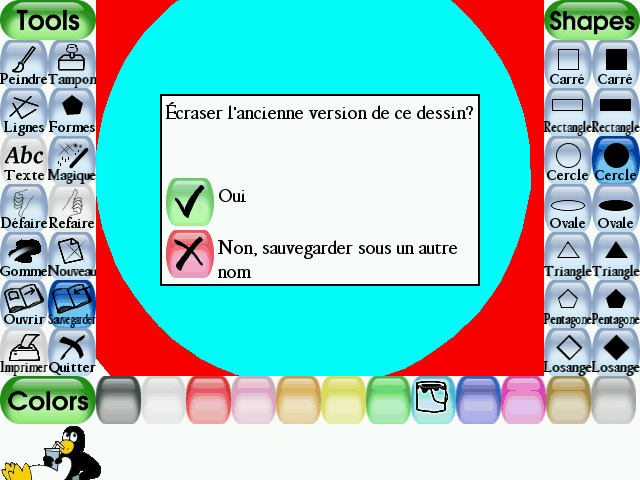
Viva la France! (click for larger image)
But French isn't the only translation. It's got, oh, just a few translations, as shown in Table B.
Table B: Tux Paint translations| Afrikaans | Galician | Norwegian Nynorsk |
| Albanian | Georgian | Polish |
| American English (default) | German | Portuguese |
| Arabic | Greek | Romanian |
| Basque | Gronings | Russian |
| Brazilian Portuguese | Hebrew | Scottish Gaelic |
| Breton | Hindi | Serbian |
| Bulgarian | Hungarian | Slovak |
| Catalan | Icelandic | Slovenian |
| Chinese (Simplified) | Indonesian | Spanish |
| Chinese (Traditional) | Irish Gaelic | Swahili |
| Croatian | Italian | Swedish |
| Czech | Japanese | Tamil |
| Danish | Kinyarwanda | Thai |
| Dutch | Korean | Tibetan |
| English (American) | Kurdish | Turkish |
| English (British) | Lithuanian | Ukrainian |
| Estonian | Malay | Vietnamese |
| Finnish | Mexican Spanish | Walloon |
| Faroese | Norwegian Bokmal | Welsh |
| Faroese | | |
Conclusion
We're very impressed with Tux Paint. It's simple and easy to use. It's clearly a program designed with kids (and fathers-in-law) in mind, it's flexible, and, of course, it's free. We give Tux Paint four suited Spheniscidae (look it up) out of five.
RATING: 4 STARS