
By John Roling
If you own a mid to high-end digital camera, or pretty much any digital SLR, you can shoot in a format other than JPEG. This format is called RAW and offers some significant advantages (as well as a couple of shortcomings) when compared to standard JPEG.
Let's first explain what RAW is. RAW formats capture the raw data from your digital camera's sensor and preserve it in a file for you to manipulate outside of the camera. No adjustments or processing are applied to the image data at all, it's simply a collection of pixel values at the time of exposure.
By comparison, when you take a photo in standard JPEG format, your camera may boost the contrast and saturation, apply some sharpening, adjust for white balance, and then compress your image into the resulting picture file. This processing all takes place in the camera before the file is saved. That means the computer brain of your camera has to make all of these calculations and adjustments before saving the file to your camera's memory.
When using JPEG, your picture has already been processed and compressed once before it reaches you for the first time. On the other hand, RAW formats are more like a traditional film negative. They contain the raw data captured off the sensor, and they need you to "develop" them before they end up as the final picture.
The downsides
Herein lies the major drawback most people encounter when using RAW: You have to post-process the photos before they can be used. Out of the camera, RAW files are not something everyone can view. Only specialized RAW conversion programs, like RawShooter Essentials in Figure A, can natively read them, and the unfortunate thing is that every RAW format for pretty much every camera is different.
FIGURE A
Pixmantec's RawShooter Essentials (click for larger image)
There is no standard for RAW, despite the best efforts of Adobe, which will be outlined later in this article. Because every camera vendor's sensor is different, the RAW formats vary widely. RAW files are also much larger than their JPEG counterparts. Since they're not compressed like a JPEG, the file sizes can be two or three times larger. This means you can fit far fewer pictures on your memory card when you shoot in RAW.
Another limitation some people find with RAW is that many cameras won't let you shoot in RAW in the camera's creative or auto modes. For example, many cameras have a sports, portrait or landscape mode that automatically sets up your camera for those conditions. Many cameras can only shoot JPEG under these circumstances. In order to utilize RAW you have to generally shoot in program mode, fully manual, or in aperture or shutter priority.
So with all of these limitations, why would you ever want to shoot RAW? The answers are control and quality. RAW formats give you the ability to develop the picture the way YOU want to, and allow you to get the most quality out of your photos.
Taking control
A RAW conversion program will allow you to convert or "develop" your photos. There are many programs to do this, ranging from freebies that come with your camera manufacturer to high-end programs costing hundreds of dollars. Which program you use is up to you, and most of the time it just comes down to which workflow and feature set you like best. More on that later.
Once you've decided on a converter, it's time to open your photo. Off the bat, you may notice that the picture doesn't look as vibrant or color accurate as you are used to from the corresponding JPEGs. Remember, the photo hasn't been processed yet; you still have some work to do.
To start, you probably want to adjust the exposure. Most converters and RAW files allow you to over or under-expose your data up to two stops. An example is shown in Figure B.
FIGURE B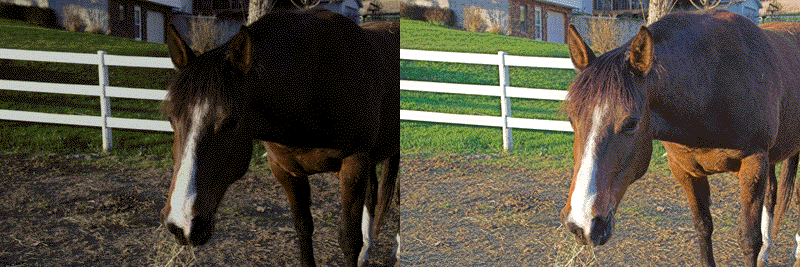
Before and after exposure compensation. (click for larger image)
This is a huge strength for RAW. If you underexposed a photo, you can bump up the exposure slider to improve details that may have been lost in the shadows. Likewise, you can dial back the exposure if you over-exposed a scene. RAW allows you much more leeway in this regard. It's much easier to fix a bad exposure in RAW than it is in JPEG.
Once you've gotten the exposure correct, you can set the white balance. A RAW converter will allow you to choose preset color temperatures (Sunlight, Shade, Flash etc.) or you can generally click a white or gray point in the scene to set the white balance that way. Setting the correct white balance sets the correct color baseline for the scene. If the auto white balance on your camera got it wrong, or if you forgot to change the white balance manually, no problem. It's a one-click fix.
So now you have a decently exposed, fairly color-accurate photo. Depending on the RAW converter, you now have a myriad of additional options: Saturation, Hue, Brightness, Sharpness, Curves, Levels, Brightness, Contrast, rotating, cropping, and more. It sounds like a lot of stuff you can do in Photoshop right? Well you're correct, but when you edit a JPEG in Photoshop it changes the data in the photo, and every time you save the file you lose more and more information. By doing a lot of these things in RAW, you are ensuring the best quality for the initially developed photo.
This doesn't mean you can't do additional work in Photoshop once you've developed the file, quite the contrary. The RAW conversion process simply allows you to get as close to perfect as you can before the conversion. This means that your job in Photoshop becomes easier and less destructive to the photo.
In fact, to get the absolute best quality out of a RAW photo, you may not want to convert directly to JPEG. You may want to convert to a 16-bit TIFF file. This gives you the most leeway in your Photoshop work. You take the RAW file, make your adjustments, save to 16-bit TIFF and then edit in Photoshop to end up with your final photo.
It may seem like a lot of work, but this development process will always give you a better photo than you can generally get directly out of the camera as a JPEG file. It also gives you endless flexibility. You still have your RAW digital "negative", and you can always re-develop the picture in different ways if you need to.
Once you get comfortable with your workflow, you can get pretty adept at getting pictures ready for conversion, and you'll be truly thankful when that perfect moment you accidentally underexposed can be saved.
RAW converters
Any camera that can shoot in RAW will come with some type of viewer and conversion program. Examples include Canon's Digital Photo Pro shown in Figure C, EOS Viewer, and Nikon's NikonCapture.
FIGURE C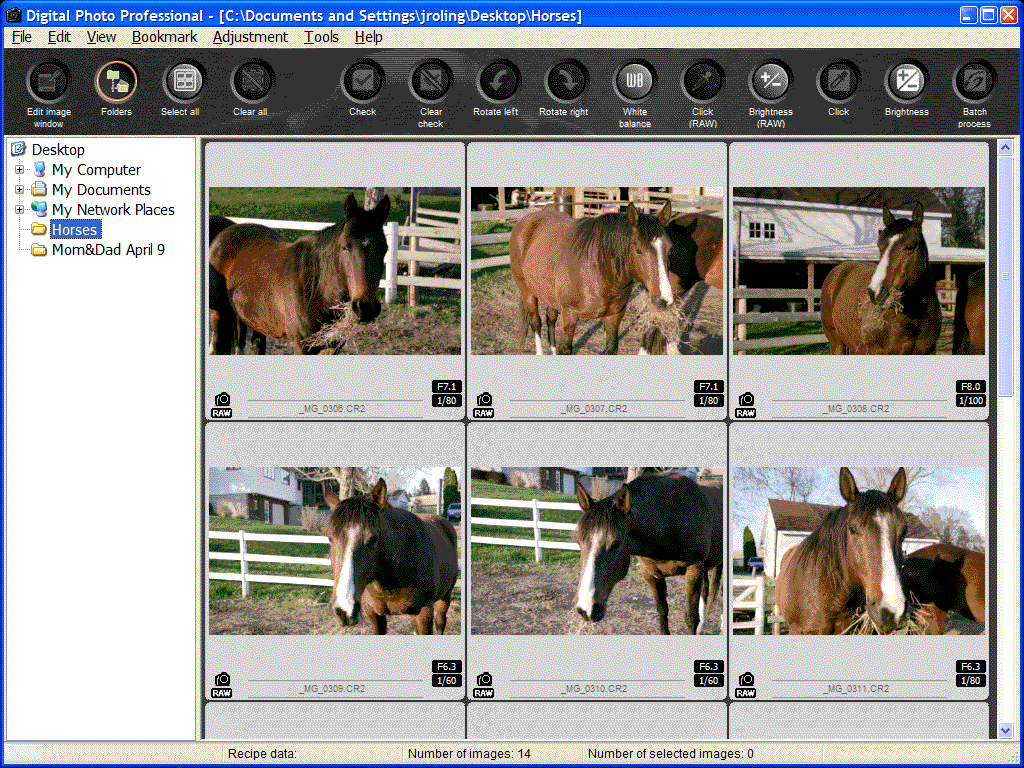
Canon's Digital Photo Pro 1.6.1 (click for larger image)
Canon's software is free with the camera, while Nikon's program is free for a trial period and then $100 after that. If you want to shoot in RAW, make sure you research the software that comes with your camera. The right software may be an important factor on which camera you choose to purchase.
Alternatively, you can use one of the many third-party programs available for purchase or online download. Some notables include CaptureOne, Bibble, RawShooter Essentials, BreezeBrowser, DxO Optics Pro, and the Adobe Camera RAW plug-in for Photoshop. Programs vary widely in workflow, features and most importantly, price. There are some very good free or low cost programs that may fit your needs perfectly. Make sure to check out any free trials, as it will allow you to compare programs without shelling out your hard earned cash first.
One format to rule them all
As I stated earlier, pretty much every digital camera that allows you to shoot in RAW has its own proprietary RAW format. So for example, a RAW file from the Canon Digital Rebel is not the same as the RAW file format in the Canon 20D. This causes headaches for a myriad of reasons.
The first is compatibility. When a company releases a new digital camera, all of the RAW software converters have to be updated to support the new formats. This takes time and effort on the part of software developers. It can also be problematic for you. What happens when five years from now there are no programs that will process RAW files from your perfectly good camera? Are all of your old "negatives" suddenly useless?
Well, you could convert your RAW files to 16-bit TIFF as an archival solution, but Adobe hopes you'll start converting your RAW files to DNG, or Digital Negative format. DNG, seen in Figure D, was released by Adobe as an open, license-free RAW format they hope will be adopted as an industry standard for RAW archival.
FIGURE D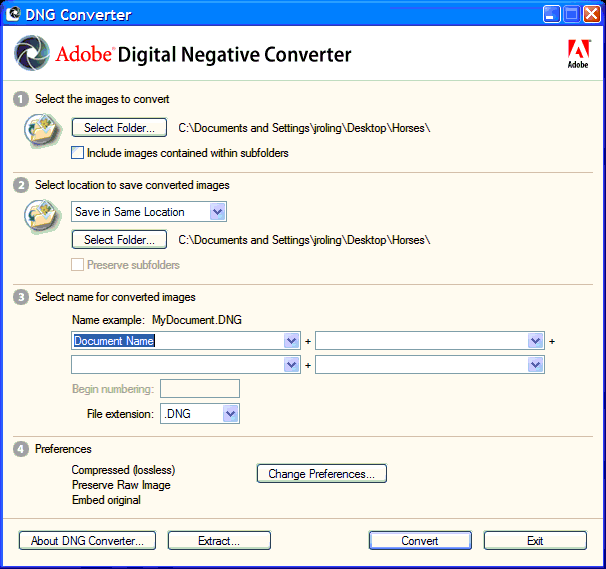
Adobe's DNG Converter. (click for larger image)
The DNG converter supports most cameras available today, and is available free of charge from the Adobe Web site. Adobe hopes camera manufacturers will start building DNG support into their own software and possibly even cameras.
Obviously Adobe has something to gain by this, but I applaud their efforts anyway. A single RAW standard will do good things for the industry, and will keep software developers from having to add support for every camera that gets released. This should allow for more software functionality going forward.
Even if DNG doesn't take off, the recently-formed OpenRAW group is urging manufacturers to open up and fully document their RAW formats to allow developers to utilize that information. Hopefully, camera manufacturers will finally get the hint and make the necessary specifications available, it'll benefit everyone involved.
Get RAW, or not...
Obviously, I'm a huge believer in the flexibility and power that shooting in RAW gives you. I would urge you to take some shots in both JPEG and RAW and see how they compare after you "develop" the RAW files.
Also, don't get discouraged if you don't like the RAW converter that comes with your camera. Try a few different converters to find out which one has the best match of features and functionality you need. While some workflows may seem tedious to you, others may fit perfectly and allow you to get great final shots with a minimum of work.
If you don't have the time or inclination to post-process your photos, or you have limited camera memory, then sticking with JPEG may be your best choice. However, if you have a little time and want the best images your camera can give you, go RAW. You'll never go back.
John Roling is an avid digital photographer, blogger and all-around techno-geek. He can be found online at http://greyhawk68.dominohosting.biz or emailed at jroling@gmail.com.