
By David Gewirtz
I want you to remember back to when you were a kid, when you could imagine anything, and even the weirdest, silliest, funniest things seemed possible. I want you to get into that mindset, into the mindset where it's OK if reality gets slightly bent, slightly distorted.
Arthur C. Clarke once said, "Any sufficiently advanced technology is indistinguishable from magic." I want you to get yourself to the point where you're ready to accept the existence of magic, accept that things can disappear from here ... and appear over there.
Now, once you're in that state, there's a better chance you'll be able to understand a magical little product called MaxiVista, an amazing piece of software that seems to violate the space/time continuum. To help you along this magical road, I'll need to be a bit more eliptical. Don't worry -- it'll all make some sort of twisted sense by the time I'm done.
Imagine the magic
Since you're imagining, I want you to imagine your computer's monitor. You've got a certain amount of workspace on it, perhaps 1024x768 pixels or even 1280x1024 pixels. In any case, you've got a finite amount working space.
Now, imagine you've got Photoshop or some other photo editing program open. You've got a bunch of palettes open and slowly, the picture you're trying to edit is getting buried under a mount of palettes, toolbars, and windows. Wouldn't it be cool if you could stick all your palettes and toolbars on another screen, leaving the whole monitor in front of you available for photo editing?
Yeah, I know, you're saying "Been there, done that." Just add another video card and a separate monitor. True, that's one way to go. In fact, that's what I've got on my desktop. I've got a second monitor that's used for just such a purpose. But remember, we're talking about magic, and while a second monitor and video card are workable solutions, they're not magic.
Instead, let's put our thinking caps on and explore the world of "what if." Let's think about how we'd create extra space on our desktops if we weren't constrained by the physical laws of reality and the entire magical world was open to us. Maybe we'd try a different approach. Here's one...
If you're like me, you've likely got a laptop in addition to that desktop computer of yours. When you're at home (or in the office), the laptop just sits in its case, lonely, missing your soft, gentle touch upon its keys, missing the opportunity for its glowing LCD to shine its happy light upon your face.
Imagine this. Imagine you could turn on your laptop and sit it down next to your desktop's monitor. But let's take it one step further. Imagine your laptop could become part of your desktop computer's desktop, just like that second monitor. Then, you'd be able to drag those toolbars and palettes from your main monitor over to your laptop's screen. You'd have the extra working space, and your laptop would once again feel the love.
Imagine if your laptop could magically become your second monitor with a mere snap of the fingers, a flick of the wrist. That'd be some serious magic, wouldn't it?
Ah, but old Art Clarke was right. Any sufficiently advanced technology is indistinguishable from magic. And that, patient reader, brings us back to MaxiVista.
The miracle of MaxiVista
MaxiVista does just that. It allows the monitor on one computer to act as a secondary monitor on another. You can see this demonstrated in Figure A.
FIGURE A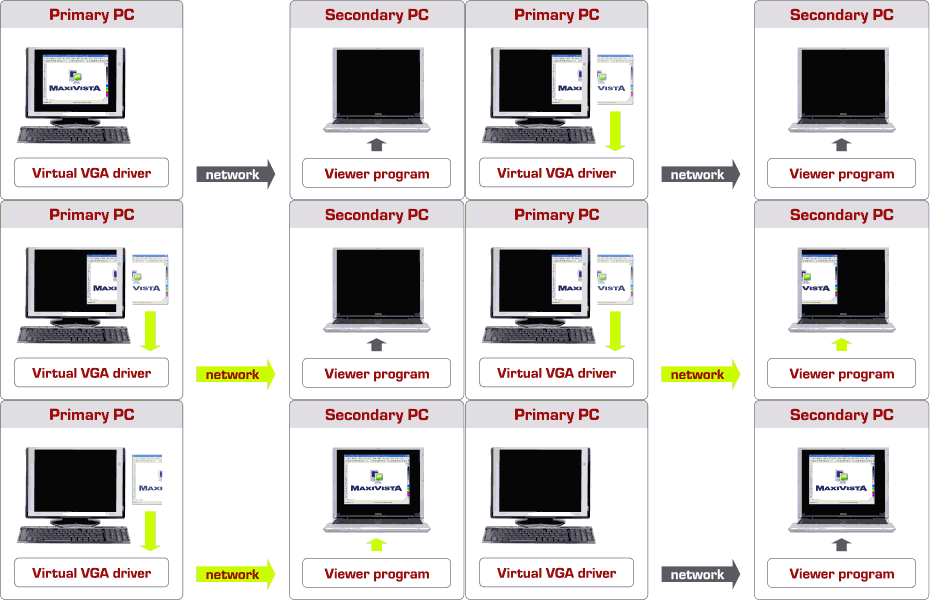
MaxiVista makes a second PC act like a second monitor.
By the way, as a rule, ZATZ publications don't use animated graphics as figures in articles. This concept's so cool, we decided to make an exception and use an animation to help demonstrate what we're talking about.
Other than a network connection between the two computers, there's no special hardware required. MaxiVista adds a new video card driver into your system. What's interesting about this video card driver is that Windows is completely convinced you've got another video card. But what you've got is a network connection. Take a look at Figure B.
FIGURE B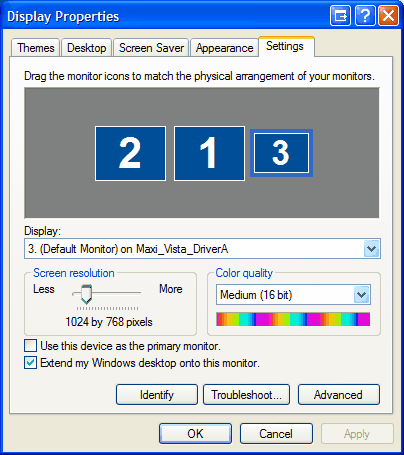
Monitor 3 is the MaxiVista virtual video card. (click for larger image)
Let's look at this screenshot carefully. As I mentioned, I've got two physical monitors in my desktop computer. In the Display Properties box, they're indicated by the big "1" and "2" boxes. When I installed MaxiVista, the box labeled "3" became available, indicating I had a third monitor installed. This wasn't really a third monitor -- it was my laptop!
Also, notice in the Display Properties box that the display is listed as a Maxi_Vista_DriverA. This is normally where you'd see the name of a video card. And, finally, notice that I've got "Extend my Windows desktop onto this monitor" checked. This tells windows that I'd want to, ah, extend my Windows desktop onto this monitor.
In other words, as far as Windows is concerned, it is another monitor. Windows has no idea that I'm really connecting to my laptop over the network.
MaxiVista installs a tray icon, which gives you some simple controls, including enabling or disabling the extended monitor capability. This is important, because when you want your laptop to function as a laptop, you want to turn off the magic and go back to using your laptop's display with your laptop.
As Figure C shows, there are a bunch of other options available for how you use the secondary computer as a monitor.
FIGURE C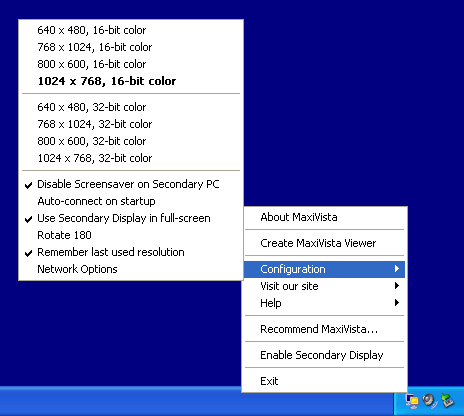
You can adjust a variety of options. (click for larger image)
There's one more thing you need to do to make all this work. You need to install a very tiny client application on your laptop or secondary computer. All you need to do is set it to autorun when you boot up, and you can basically forget it.
So, how well does this thing work?
I was astounded. First, the system does auto-discovery, so you don't need to set IP addresses or protocols for your laptop to make it work as a second monitor. I just selected "Enable secondary display" from the tray icon and my laptop became an additional monitor. No configuration was involved. It just worked.
I was very skeptical about video performance. I expected to see some serious lag. There was none. Now, to be fair, I've got a very high-end desktop and a 100Base-T network connection between the laptop and my desktop. But a 100Base-T connection is pretty standard for Ethernet and my laptop's just an old 800Mhz chugger, so we're not talking about anything unusual. You're likely to experience similar performance.
Obviously, I wouldn't want to play a first-person shooter videogame on the laptop's extended display. But I wouldn't want to play a first person shooter on the laptop anyway. I did decide to do one cruel test. I dragged a running video clip from my desktop over to the laptop's display to see how it worked.
At first, it didn't. But there was a good reason and it wasn't MaxiVista's fault. Both monitors need to be running at the same video depth. I had one at 16-bit and one at 32-bit. I changed the laptop to 32-bit color quality (again using the Display Properties dialog), and I could drag the video from my main desktop display to MaxiVista's virtual display on the laptop. It ran flawlessly, with not a single dropped frame.
You can go to the MaxiVista site (at http://www.maxivista.com) and download a 30-day trial to see this little wonder for yourself. The product's $49.95, which we think is well worth it, if for no other reason than it restores our faith in magic. We give MaxiVista a mind-blowing 5 out of 5.
RATING: 5 STARSUltraMon, another useful tool
Once you start to explore the world of multiple monitors, you may find that there are some tweaks that you may want to be able to do more easily. You may want to be able to quickly turn on or off the secondary (or, in my case, tertiary) monitor. We found a wonderful little tool called UltraMon that quickly made itself indispensible.
You may want to easily send a window from one monitor to another, or extend your task bar from monitor to monitor, or even simply have different wallpaper images on each monitor. In fact, as Figure D shows, you can even run a separate screen saver on each monitor.
FIGURE D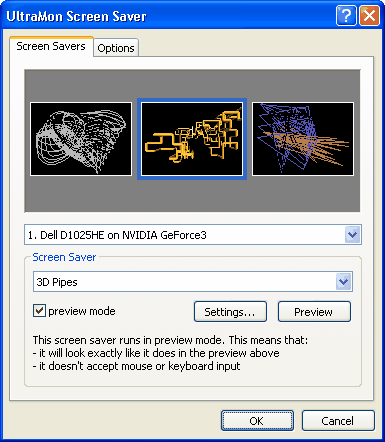
UltraMon let's you get screensaver-happy! (click for larger image)
UltraMon actually does a lot more, but we don't have room in this article to cover everything it does. Suffice it to say, if there's a feature you need for managing multiple monitors, UltraMon's likely to have it. At $39.95, it's a little bit more expensive than we'd like, but we can still give it an indispensable 4 out of 5.
RATING: 4 STARS